05 / MOTHERBOARD
What Makes Motherboards Pricey? B850 vs X870
A motherboard doesn’t directly decide your frame rate, but it does decide how you can upgrade later.
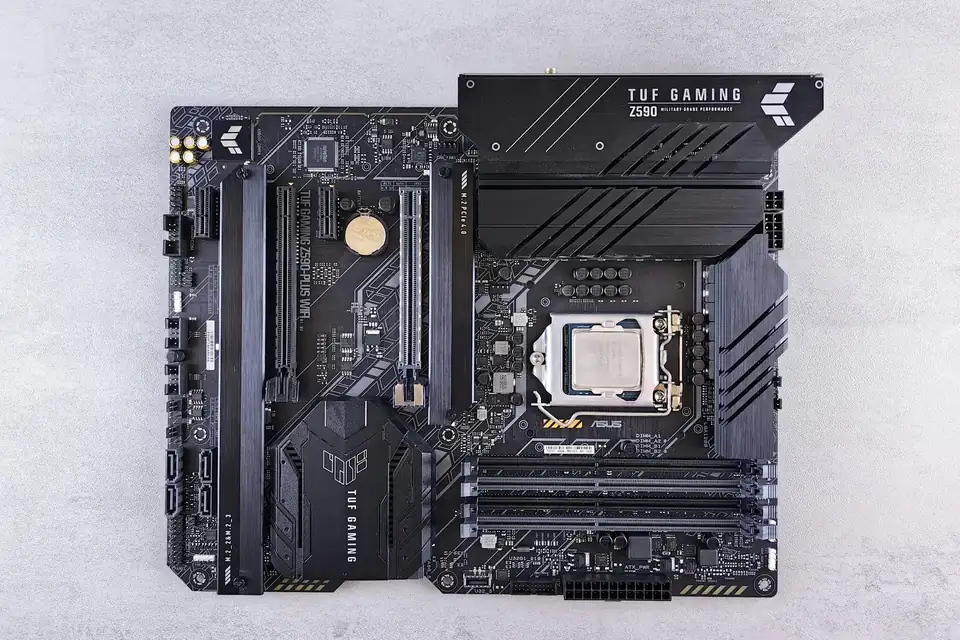
The motherboard is the foundation of the whole system. Platform compatibility, power delivery and the ports you’ll actually use matter more than how premium the chipset name sounds.
A foundation, not an engine
The motherboard connects the CPU, memory, graphics card, SSD and peripherals, provides the power circuitry, expansion slots and all kinds of ports, and manages start-up and hardware settings through the BIOS. Fan headers, networking and audio often live on the motherboard too.
Pricier boards usually offer more ports, greater expansion and sturdier power delivery and cooling, but the same CPU and graphics card won’t gain a single frame just because the board costs more. Sacrificing graphics card budget for ports you’ll never use isn’t worth it.
AM5 and the BIOS
AM5 is AMD’s current processor socket platform. An AM5 motherboard must be paired with an AM5 processor from its support list and DDR5 memory; a CPU designed for a different socket simply won’t fit.
Whether a specific model is supported depends on the motherboard’s CPU support list and BIOS version. Newly released processors may need a BIOS update first — don’t skip this step. Follow the manufacturer’s procedure when updating, and never cut the power midway.
What separates B850 from X870
The chipset determines part of a platform’s expansion capability and its positioning. B850 is mainstream, while X870/X870E sits higher up the range, but each board’s USB, M.2, PCIe, networking and power delivery still depend on the specific model — not just the chipset name.
For a gaming PC with one graphics card and one or two SSDs, B850 is usually more than enough. If you need several high-speed SSDs, lots of peripherals or a particular USB standard, compare port counts and lane allocation item by item.
Wi-Fi, size and headers
A motherboard with Wi-Fi spares you from running a network cable, but real-world speed and stability also depend on your router and signal conditions. For stable gaming, a wired connection is still the first choice.
Form factors such as ATX and Micro-ATX must match the case. Count the front USB, fan, ARGB and M.2 connections carefully too. And never mix up 5V 3-pin ARGB with 12V 4-pin RGB — the names may be similar, but the voltages are not.
This guide offers general buying advice. Examples reference our hardware catalogue and do not reflect live stock or guarantee the performance of any specific model. Manufacturer specifications govern compatibility; prices and available options are as shown in the build configurator.